

Berikut adalah panduan lengkap dan terbaru cara membuat akun Facebook, langkah demi langkah, disertai dengan gambar sebagai panduan visual.
🔹 Langkah 1: Buka Halaman Facebook
-
Buka browser kamu (Google Chrome, Firefox, Safari, dll).
-
Kunjungi situs: https://www.facebook.com
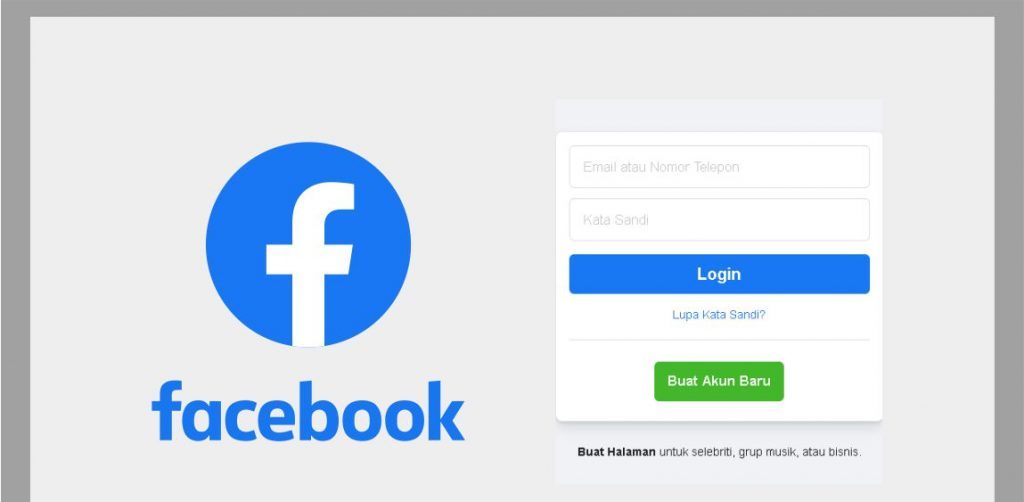
🖼️ Tampilan awal halaman Facebook:
🔹 Langkah 2: Klik “Buat Akun Baru”
-
Pada halaman utama, klik tombol “Buat Akun Baru” (biasanya berwarna hijau atau biru).
🔹 Langkah 3: Isi Formulir Pendaftaran
Formulir yang harus kamu isi:
-
Nama depan dan belakang
-
Nomor HP atau email (Cara bikin email Gmail)
-
Kata sandi baru
-
Tanggal lahir
-
Jenis kelamin (Laki-laki / Perempuan / Kustom)
📝 Tips:
-
Gunakan email aktif atau nomor HP yang kamu akses.
-
Kata sandi sebaiknya terdiri dari huruf besar, huruf kecil, angka, dan simbol untuk keamanan.
🔹 Langkah 4: Klik “Daftar”
Setelah mengisi semua kolom, klik tombol “Daftar” (biasanya di bawah form).
🔹 Langkah 5: Verifikasi Akun
-
Facebook akan mengirimkan kode verifikasi ke email atau nomor HP kamu.
-
Buka email/SMS dan masukkan kode tersebut ke halaman verifikasi Facebook.
🔹 Langkah 6: Selesai!
-
Setelah verifikasi berhasil, kamu langsung masuk ke akun Facebook baru kamu.
-
Selanjutnya kamu bisa:
-
Mengunggah foto profil
-
Menambahkan teman
-
Membuat status
-
Menyesuaikan pengaturan privasi
-
🔹 (Opsional) Tambahkan Foto Profil dan Sampul
-
Klik di bagian “Tambahkan Foto Profil” dan pilih dari galeri atau ambil langsung.
-
Lakukan hal yang sama untuk “Foto Sampul”.


Thank you for the good writeup. It in fact was a amusement account it.
Look advanced to more added agreeable from you! By the way, how could
we communicate?
Please let me know if you’re looking for a article writer for your site.
You have some really good articles and I believe I would be a good asset.
If you ever want to take some of the load off, I’d absolutely love to write some material for your
blog in exchange for a link back to mine. Please shoot me an e-mail
if interested. Thanks!
Greate article. Keep posting such kind of info on your page.
Im really impressed by your blog.
Hey there, You have performed an excellent job. I’ll certainly digg it and individually suggest to my friends.
I am confident they’ll be benefited from this site.
I’m gone to tell my little brother, that he should also pay a visit this webpage on regular basis to get updated from most recent reports.
I absolutely love your blog and find most of your post’s to be just what
I’m looking for. Does one offer guest writers to write content for you personally?
I wouldn’t mind publishing a post or elaborating on a lot of the
subjects you write with regards to here. Again, awesome blog!
Just wish to say your article is as astonishing.
The clarity in your publish is just excellent and i could think you are
knowledgeable on this subject. Well along with
your permission let me to grab your feed to keep up to date
with drawing close post. Thank you 1,000,000 and please carry on the rewarding work.
Hello, after reading this amazing piece of writing
i am too cheerful to share my know-how here with
friends.
Good day! I know this is kinda off topic but I’d figured I’d ask.
Would you be interested in exchanging links or maybe guest writing a blog post or vice-versa?
My website goes over a lot of the same subjects as yours and I
think we could greatly benefit from each other.
If you’re interested feel free to send me an e-mail.
I look forward to hearing from you! Superb blog by the way!
Nice answers in return of this difficulty with solid arguments and explaining everything concerning that.
Hey! I just wanted to ask if you ever have any trouble with hackers?
My last blog (wordpress) was hacked and I ended up losing
many months of hard work due to no data backup.
Do you have any solutions to protect against hackers?