

Berikut adalah panduan lengkap dan terbaru cara membuat akun Facebook, langkah demi langkah, disertai dengan gambar sebagai panduan visual.
🔹 Langkah 1: Buka Halaman Facebook
-
Buka browser kamu (Google Chrome, Firefox, Safari, dll).
-
Kunjungi situs: https://www.facebook.com
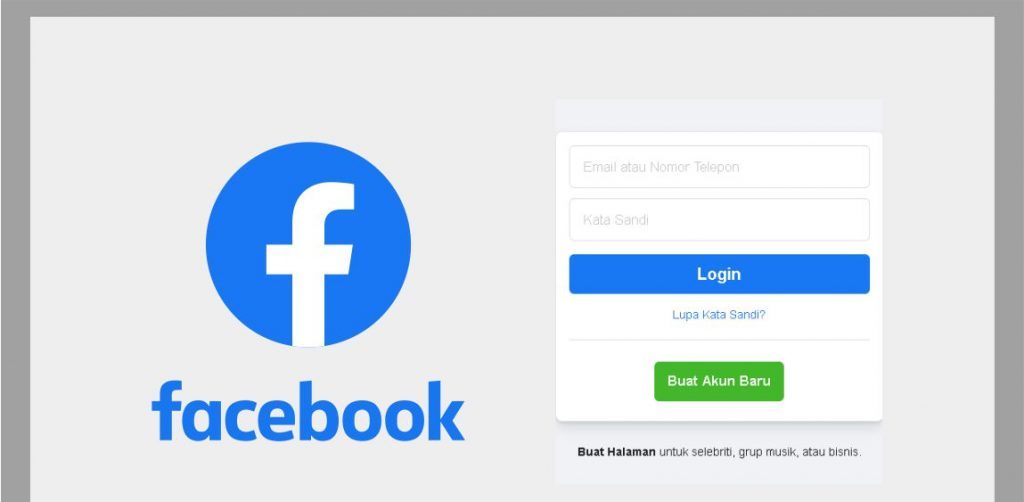
🖼️ Tampilan awal halaman Facebook:
🔹 Langkah 2: Klik “Buat Akun Baru”
-
Pada halaman utama, klik tombol “Buat Akun Baru” (biasanya berwarna hijau atau biru).
🔹 Langkah 3: Isi Formulir Pendaftaran
Formulir yang harus kamu isi:
-
Nama depan dan belakang
-
Nomor HP atau email (Cara bikin email Gmail)
-
Kata sandi baru
-
Tanggal lahir
-
Jenis kelamin (Laki-laki / Perempuan / Kustom)
📝 Tips:
-
Gunakan email aktif atau nomor HP yang kamu akses.
-
Kata sandi sebaiknya terdiri dari huruf besar, huruf kecil, angka, dan simbol untuk keamanan.
🔹 Langkah 4: Klik “Daftar”
Setelah mengisi semua kolom, klik tombol “Daftar” (biasanya di bawah form).
🔹 Langkah 5: Verifikasi Akun
-
Facebook akan mengirimkan kode verifikasi ke email atau nomor HP kamu.
-
Buka email/SMS dan masukkan kode tersebut ke halaman verifikasi Facebook.
🔹 Langkah 6: Selesai!
-
Setelah verifikasi berhasil, kamu langsung masuk ke akun Facebook baru kamu.
-
Selanjutnya kamu bisa:
-
Mengunggah foto profil
-
Menambahkan teman
-
Membuat status
-
Menyesuaikan pengaturan privasi
-
🔹 (Opsional) Tambahkan Foto Profil dan Sampul
-
Klik di bagian “Tambahkan Foto Profil” dan pilih dari galeri atau ambil langsung.
-
Lakukan hal yang sama untuk “Foto Sampul”.






Hi there are using WordPress for your blog platform? I’m new to the blog world but I’m trying to get
started and set up my own. Do you require any coding expertise to make your own blog?
Any help would be greatly appreciated!
I have been exploring for a little bit for any high quality
articles or blog posts on this sort of house .
Exploring in Yahoo I finally stumbled upon this site. Studying this information So i’m glad to convey that I have a very excellent
uncanny feeling I discovered just what I needed. I most for sure will make sure to
don?t forget this website and give it a glance regularly.
The other day, while I was at work, my cousin stole my apple ipad and tested to see if it can survive
a forty foot drop, just so she can be a youtube sensation. My iPad is now destroyed and she has 83 views.
I know this is entirely off topic but I had to share it with someone!
We are a group of volunteers and starting a new scheme in our community.
Your site offered us with valuable info to work on. You have done an impressive job and our entire community will be grateful
to you.
Woah! I’m really enjoying the template/theme of this website.
It’s simple, yet effective. A lot of times it’s tough to get that “perfect balance” between usability and visual appearance.
I must say that you’ve done a excellent job with this. Also, the blog loads super quick for
me on Internet explorer. Exceptional Blog!
Hi, I do think this is an excellent site. I stumbledupon it 😉 I may
revisit once again since I book-marked it. Money and freedom
is the greatest way to change, may you be rich
and continue to help other people.
Howdy would you mind letting me know which hosting company you’re utilizing?
I’ve loaded your blog in 3 different browsers and I must say this blog loads a lot faster then most.
Can you recommend a good hosting provider at a honest price?
Kudos, I appreciate it!
No matter if some one searches for his essential thing,
thus he/she wishes to be available that in detail, therefore that thing is maintained over
here.
Wonderful work! That is the kind of info that are meant to be shared across the web.
Shame on the search engines for no longer positioning this put up
higher! Come on over and discuss with my web site .
Thank you =)
I every time used to study post in news papers but now as I am a user of net so from now I am using net for posts, thanks to web.