

Berikut adalah panduan lengkap dan terbaru cara membuat akun Facebook, langkah demi langkah, disertai dengan gambar sebagai panduan visual.
🔹 Langkah 1: Buka Halaman Facebook
-
Buka browser kamu (Google Chrome, Firefox, Safari, dll).
-
Kunjungi situs: https://www.facebook.com
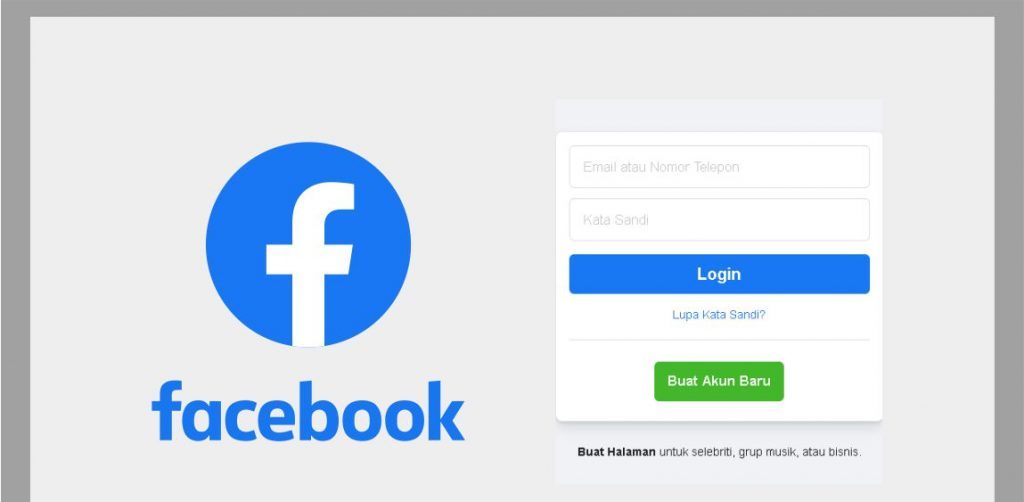
🖼️ Tampilan awal halaman Facebook:
🔹 Langkah 2: Klik “Buat Akun Baru”
-
Pada halaman utama, klik tombol “Buat Akun Baru” (biasanya berwarna hijau atau biru).
🔹 Langkah 3: Isi Formulir Pendaftaran
Formulir yang harus kamu isi:
-
Nama depan dan belakang
-
Nomor HP atau email (Cara bikin email Gmail)
-
Kata sandi baru
-
Tanggal lahir
-
Jenis kelamin (Laki-laki / Perempuan / Kustom)
📝 Tips:
-
Gunakan email aktif atau nomor HP yang kamu akses.
-
Kata sandi sebaiknya terdiri dari huruf besar, huruf kecil, angka, dan simbol untuk keamanan.
🔹 Langkah 4: Klik “Daftar”
Setelah mengisi semua kolom, klik tombol “Daftar” (biasanya di bawah form).
🔹 Langkah 5: Verifikasi Akun
-
Facebook akan mengirimkan kode verifikasi ke email atau nomor HP kamu.
-
Buka email/SMS dan masukkan kode tersebut ke halaman verifikasi Facebook.
🔹 Langkah 6: Selesai!
-
Setelah verifikasi berhasil, kamu langsung masuk ke akun Facebook baru kamu.
-
Selanjutnya kamu bisa:
-
Mengunggah foto profil
-
Menambahkan teman
-
Membuat status
-
Menyesuaikan pengaturan privasi
-
🔹 (Opsional) Tambahkan Foto Profil dan Sampul
-
Klik di bagian “Tambahkan Foto Profil” dan pilih dari galeri atau ambil langsung.
-
Lakukan hal yang sama untuk “Foto Sampul”.


I know this if off topic but I’m looking into starting my own weblog and
was wondering what all is required to get setup? I’m assuming having
a blog like yours would cost a pretty penny? I’m not very web savvy so
I’m not 100% sure. Any tips or advice would be greatly appreciated.
Cheers
Magnificent web site. A lot of helpful info here. I am sending it to a few friends ans additionally sharing in delicious.
And naturally, thank you on your effort!
Hi there, I log on to your blog like every week. Your writing style is awesome,
keep doing what you’re doing!
Sweet blog! I found it while searching on Yahoo News. Do you have
any suggestions on how to get listed in Yahoo News? I’ve been trying for a
while but I never seem to get there! Appreciate it
https://aaqxidivhs.com/r/dbda8c42597b40f58cf38c81a4d0aefd/1000/post-u – Eniyahic Imubyix https://aaqxidivhs.com/r/dbda8c42597b40f58cf38c81a4d0aefd/1000/post-t
https://aaqxidivhs.com/r/dbda8c42597b40f58cf38c81a4d0aefd/1000/post-u – Eniyahic Imubyix https://aaqxidivhs.com/r/dbda8c42597b40f58cf38c81a4d0aefd/1000/post-t
Wonderful blog! Do you have any recommendations for aspiring writers?
I’m planning to start my own blog soon but I’m a little lost on everything.
Would you suggest starting with a free platform like WordPress or go for a paid option? There are so many choices
out there that I’m totally confused .. Any tips? Appreciate it!